
Daymark Weekly Planner · Planning guide
How to Time Block Your Week
Build a workable time-blocking schedule in four passes: place fixed commitments, choose a few priorities, give them realistic blocks, then review and adjust. Start with the week you have; the plan is a draft you can revise.
Build a first-week time-blocking schedule
Stanford’s weekly-planning guidance places personal needs and fixed commitments before task work and recommends leaving room for changes. The process below adapts those principles to a working week; the schedules are illustrative, not measured routines.
1. Add fixed commitments
Put appointments, shifts, school runs, standing meetings, and other commitments you cannot readily move into the week first. Include the travel, preparation, and handoff time that makes them possible. If a meeting is 10–11 but you need time to travel or reset afterward, represent that too. This shows how much usable time is actually available. Personal needs such as meals and breaks belong in the picture as well; they are part of the week you have, not spare capacity.
2. Choose a short list of priorities
Write down the work competing for the remaining hours, then choose one or two outcomes that matter most if the week gets crowded. Turn each into a visible next action: “draft the proposal outline” is easier to schedule than “work on business.” If a task is large, block a first step such as gathering the source material or outlining the sections. Keep the rest on a separate list until you know where it fits. A plan is a set of choices about time, not a promise that every task will fit.
3. Place the work and leave room
Schedule demanding work at a time when you can reasonably give it attention. Put a buffer after appointments that often run long, before a deadline, or between locations. Group small related tasks such as calls or routine follow-up when that suits the work. Leave some open space around commitments and between blocks; there is no universal number of hours to reserve. If most of your week is already spoken for or interruptions are common, begin with one or two priority blocks and leave the rest flexible.
Choose a duration that can produce a useful next step. Estimate, try it, and use what you learn to adjust the next block. Include transitions and breaks in the plan instead of treating them as invisible time. Give blocks useful names that describe the activity or result, such as “outline report” or “return client calls”; labels help you see what the time is for, while categories or colors are optional if your format supports them.
Use categories to see the shape of the week
A few labels or colours can show whether meetings, focused work and personal commitments are competing for the same hours. Start with categories that help you make a decision; a separate colour for every project can become another system to maintain. Keep the task name and time readable without relying on colour alone. If categories do not change a planning decision, you can leave them out.
4. Review and adjust
Choose a repeatable time to look over the coming week. During the week, check what changed and revise only the affected blocks. Shorten, move, or defer flexible work while keeping fixed commitments visible. If a task no longer fits, decide what should leave the week rather than silently extending every day.
How big should each block be?
Start from the next meaningful step, not an idealized duration. A short batch of routine messages may need a modest window; drafting a report section may need a longer stretch plus a break. Ask: what could I finish or materially advance in this session, and what must happen before the next commitment? If the estimate is uncertain, schedule a first session to scope the task, then place the follow-up after you learn more.
Repeated overruns suggest the block was too small, the task was unclear, or interruptions were underestimated. If you finish early, leave the time open or start another flexible task only after checking the next fixed commitment. Do not fill every gap just because a task ended early. Transitions, meals, and recovery time all need room.
A Sunday planning routine you can repeat
Sunday is useful when it gives you a clear view of the week ahead, but it is not a rule. Choose a time that fits your household and work pattern; Monday morning or another regular checkpoint works too. Keep the routine focused on decisions:
- Open the next seven days and place fixed appointments, shifts, travel, school handoffs, and personal commitments.
- Review the task list and choose the few outcomes that deserve protected time this week.
- Break large outcomes into schedulable next actions and estimate an initial block length.
- Place those blocks where the work can plausibly happen. Leave open periods around reactive work and commitments likely to overrun.
- Decide what can move if the week gets crowded, and choose a brief time to check the plan again.
Before you finish, ask whether the calendar describes the week you are likely to have, including known disruptions, rather than the week you wish you had. If Sunday is full, use another day; a planning routine should make the week clearer, not become another obligation.
Try it: does the work fit the time available?
Start with the hours you can actually plan, after sleep, meals, travel and personal commitments. Subtract fixed work commitments and the space you want to leave unassigned. The remainder is a limit on what you can place, not a target to fill.
This is simple capacity arithmetic. Fourteen scattered hours may not contain the uninterrupted sessions you need. Check the actual openings, energy and deadlines before placing a task. Values are not saved.
Should the displayed week start on Sunday or Monday?
Choose the week boundary that helps you see the next seven days clearly. A Monday-start view may keep the working week together; a Sunday-start view may fit household commitments better. The day you review the plan and the first day shown on the page are separate choices. When you reuse a template or copy events, check the dates and weekend commitments rather than assuming the view starts where you expect.
Four role-based examples: a day and its place in the week
These examples show how the same planning decisions change with different fixed points. They are starting sketches, not model routines or promises about what a role's day looks like. Adjust the hours, obligations, and workload to your circumstances.
A small-business owner: protect delivery work around clients
Suppose Tuesday includes one client call and a proposal deadline later in the week. The owner puts delivery work first, leaves a transition after the call, and keeps admin movable.
- 9:00–9:30: Check urgent client messages and choose the day's deliverable.
- 9:30–11:30: Complete a named piece of client work.
- 11:30–12:00: Open buffer for notes or an overrun.
- 12:00–1:00: Fixed client call.
- 1:00–1:30: Lunch and transition.
- 1:30–2:00: Draft the proposal outline if the call ends on time.
- 2:00–3:00: Admin or open time for new client requests.
If the call runs long, the proposal moves to a later open period. The owner does not turn the buffer into a second deadline or displace a fixed commitment.
The owner’s wider week: Place Monday’s delivery milestone, Tuesday’s client call, Wednesday’s business-development session, Thursday’s proposal revision and Friday’s admin review around the appointments already agreed. A customer emergency may displace a flexible stage; it should trigger a choice about scope or timing, not an invisible addition to the workday.
A parent: plan around handoffs and an uncertain afternoon
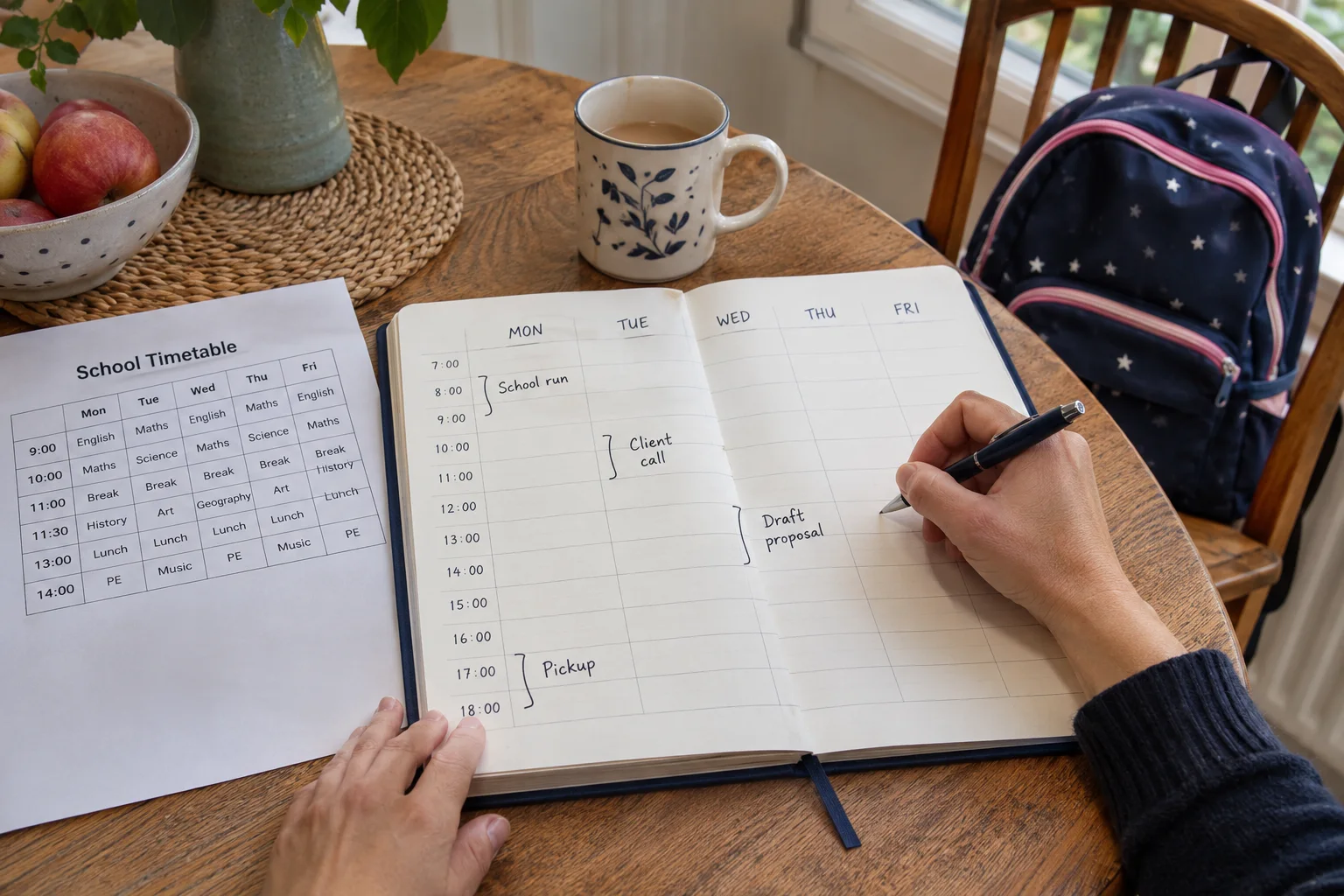
Suppose Wednesday has a school drop-off and pickup, with a work or study window between them.
- 8:00–9:00: School drop-off and travel (fixed).
- 9:00–10:30: One priority work or study task.
- 10:30–11:00: Break and transition.
- 11:00–12:30: Flexible second task, chosen so it can be shortened.
- 12:30–1:30: Lunch and open time.
- 1:30–2:30: Errand or household task if it fits.
- From 2:30: Travel, pickup, and family commitments (fixed).
If pickup shifts earlier, the flexible task or errand moves first. Keeping travel and handoff time visible avoids relying on an impossible last-minute transition.
Across the week: Monday is for the first task draft, Tuesday for a scheduled appointment and shorter work session, Wednesday follows the example above, Thursday holds the next project step, and Friday leaves space for unfinished household or work tasks. Pickup stays visible on every relevant day. If a child is home unexpectedly, reduce the planned work rather than leave two incompatible responsibilities in the same hour.
A freelancer: keep client work visible while leaving room for requests
Suppose Monday has a client call and a deliverable due soon. The freelancer protects the deliverable and uses open time for requests that cannot be predicted in advance.
- 9:00–9:30: Review messages and identify the next deliverable step.
- 9:30–11:30: Client project work.
- 11:30–12:00: Buffer for notes or an overrun.
- 12:00–1:00: Lunch.
- 1:00–2:00: Fixed client call.
- 2:00–3:30: Continue the deliverable or prepare the next concrete step.
- 3:30–4:00: Invoicing and follow-up.
If the call creates new work, capture the request and decide what it displaces at the next planning check. Do not silently replace the afternoon priority without making that choice.
Across the week: Use Monday to scope and start the deliverable, Tuesday for a protected production session, Wednesday for client feedback, Thursday for revisions, and Friday for delivery and invoicing. Those are flexible project stages, not compulsory day themes. Put the actual deadline and client availability in first, then move the stages to fit.
A clinician: respect workplace scheduling and care obligations
This sketch only illustrates how a person might distinguish fixed appointments from movable administrative work. Local policy, staffing, patient needs, and professional responsibilities govern the real schedule.
- 8:00–9:00: Team handoff or preparation only where permitted.
- 9:00–12:00: Scheduled appointments (fixed).
- 12:00–1:00: Protected break, with any permitted documentation in a separately reserved window.
- 1:00–3:00: Scheduled appointments (fixed).
- 3:00–3:30: Contingency space if workplace scheduling allows.
- 3:30–4:00: Documentation and close-out only as permitted.
If appointments overrun, clinical obligations take precedence. Only work that can legitimately move should be moved.
Across the week: Keep each day’s actual appointment and handoff schedule as the starting point. Monday may include preparation, Tuesday a team meeting, Wednesday the example clinic day, Thursday permitted administrative work, and Friday a handoff or review. Do not assume a block available on one day is available on every other day. This is a planning example, not a clinical scheduling recommendation. Keep patient or client-identifying details out of a general personal planner.
A worked week, with one change
Imagine a consultant with a Monday team check-in, a Wednesday client call, and a report due Friday. The example is illustrative; adapt the hours and workload to your own commitments.
| Day | Fixed commitment | Priority work | Open time |
|---|---|---|---|
| Monday | Team check-in, 9:00–9:30 | Draft report, 10:00–12:00 | 12:00–1:00; 3:00–4:00 |
| Tuesday | Client call, 10:00–11:00 | Review report notes, 1:00–2:00 | 11:00–12:00; 2:00–3:00 |
| Wednesday | Client call, 12:00–1:00 | Report work, 9:30–11:30 | 1:00–2:00 |
| Thursday | — | Proposal work, 10:00–12:00 | 12:00–1:00; 2:00–4:00 |
| Friday | Report delivery, 10:00 | Follow-up and weekly review, 1:00–2:00 | 11:00–12:00; 2:00–3:00 |
Selected blocks from an illustrative week; unlisted hours are omitted, not necessarily free.
Suppose an urgent client issue takes Wednesday morning’s report block. Keep the noon call in place. Use Wednesday’s open hour to identify what remains, then move report completion into Thursday afternoon. If the remaining report needs more than Thursday’s open hours, decide which other work can move or leave the week. The schedule makes the trade-off visible; it cannot create extra capacity.
What about meetings you do not control?
Place agreed meetings in the plan before promising yourself uninterrupted work. A block in your planner does not reserve another person’s calendar. If you can negotiate availability, agree which windows are protected and which accept meetings; if you cannot, reserve fewer flexible work blocks around the actual commitments.
Plan the whole week to see capacity across days, then make a short daily check for new appointments and changed priorities. You do not need to rebuild the week each morning. The skill is learning which estimates and assumptions to change, not following the first draft without interruption.
What happens in week two?
Copy the useful parts, not every promise
Before copying a week, remove one-off appointments and completed work. Keep recurring commitments and blocks that fit your actual capacity. On paper, copy just the recurring structure into a new page. In a digital tool, check what its copy, duplicate or repeat command does before using it. Some replace destination content; others add another set of events. Inspect the next week’s appointments first so reuse does not create a conflict or duplicate.
Next, add the new week’s real appointments. Revise copied task names so they describe the next action rather than the task you already finished. If Tuesday’s writing block moved three times, change its position or size before repeating it. An unchanged template is not the goal; reducing repeated setup is.
Can I start from a template?
Once you have a reusable pattern, keep a clean master copy with a name you recognize, such as “client week” or “school-term week.” Reuse that pattern as a draft, then add the next week’s actual appointments. Whether you photocopy a page, duplicate calendar events or apply a saved digital template, the recurring structure is only the starting point.
Keep templates limited to genuine recurring patterns. If a template contains last week’s dated appointments and specific deliverables, copying it may create more cleanup than starting with fixed commitments.
What should you do when a block runs over?
Protect the next fixed commitment before deciding whether to continue. Then choose among three responses:
- Move: Put the remaining work into a real opening before its deadline.
- Split: Stop at a useful boundary, such as a completed outline, and schedule the next stage separately.
- Defer or reduce: If there is no opening, decide what other work can wait, reduce the task’s scope, or discuss the deadline.
Do not stretch the block through an appointment or quietly move every later task into the evening. If the same block overruns repeatedly, change the estimate or task size next time. When disruption becomes the reason you stop planning altogether, read how to restart when time blocking stops fitting.
Check and adjust the plan on a phone
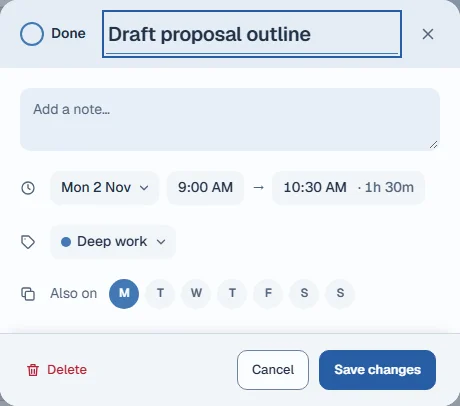
A phone is useful for checking the next commitment and making a small change during the day; it does not have to be where you design the whole week. Keep task names short enough to recognize at a glance. Before relying on a mobile tool, try editing one block’s date, start and end times, then check whether the change is visible in the week view.
Use precise time fields when a drag is awkward on a small screen. Check that you have moved the intended block rather than copied it or changed its duration. If the phone view shows one day, check the destination day before moving work there. Exact controls differ between apps; the planning decision is the same.
Know where the plan is saved. A paper copy, a calendar account and a browser-local planner have different backup and sharing arrangements. If you plan on a computer and check on a phone, test that workflow before the week depends on it. Do not assume opening the same website on another device brings the plan across.
Paper, calendar or weekly planner?
| Format | Useful when | Change to account for |
|---|---|---|
| Paper | You want a visible plan away from screens. | Moving a block means erasing, crossing out, or writing another draft. |
| Calendar | Meetings, invitations and availability need to share one place. | Your own work blocks sit among events controlled by other people. |
| Weekly planner | You want to arrange your own work around a few fixed commitments. | Fixed events may need to be entered manually; check export and storage boundaries. |
Calendar files, printouts and backups do different jobs
If you use Google Calendar, Apple Calendar or Outlook, you can time block directly by adding named events. If you plan elsewhere and import an .ics calendar file, check whether that workflow is a one-time snapshot or an ongoing subscription. A one-time import does not keep later edits in step. Reimporting can create duplicates, so inspect the destination before repeating it.
A printout or PDF is a reference copy, not a live plan. Mark changes by hand or print again when needed. A restorable backup is different: it should preserve the data in the format your tool can reopen. Check the tool’s restore behavior before replacing existing weeks.
Finish with a review, not a grade
At the end of the week, compare intended work with what happened. Which blocks held? Which moved because the estimate was wrong? Which were displaced by something more important? Which no longer deserved a place? Remove obsolete work before carrying anything forward.
Change one assumption in the next plan: a longer transition, a smaller task, a different work window, or fewer priorities. A single unusual week is not enough to tell you the whole system needs replacing. If you are new to the term, the definition and examples of time blocking explain the method before you set up another week.
Further reading
Stanford Center for Teaching and Learning: Weekly Planning — Time Blocking Method explains a flexible weekly planning process. The schedules in this guide are illustrative examples.